


Most vocal recording workflows look like this: record a take, listen back, realize the quiet verse is buried and the chorus is clipping, adjust the gain, try again, add compression after the fact, spend an hour tweaking EQ to fix problems that happened at the source.
Smooth was built to collapse that cycle. It's an adaptive recording tool that listens to your performance in real time and adjusts its processing to match — not with static settings, but with behavior that responds to how you're singing right now, in this moment.
This isn't a review or a feature list. It's a practical walkthrough of how to actually use Smooth to get better vocal recordings with less work.
What Smooth Actually Does
Smooth sits between your microphone and your DAW. It processes the signal from your audio interface and applies adaptive EQ, dynamics control, and tonal shaping — all calibrated to the incoming signal in real time.
The key word is adaptive. A static compressor applies the same ratio and threshold regardless of what's happening. Smooth adjusts its behavior based on the characteristics of what it's hearing: how loud, how dynamic, how bright, how much low-end energy. When you whisper, it responds differently than when you belt. When you lean into the mic, it compensates differently than when you pull back.
The result is a recorded signal that's more consistent, more present, and closer to mix-ready — without you touching a single knob during the session.
The Three Mic Characters
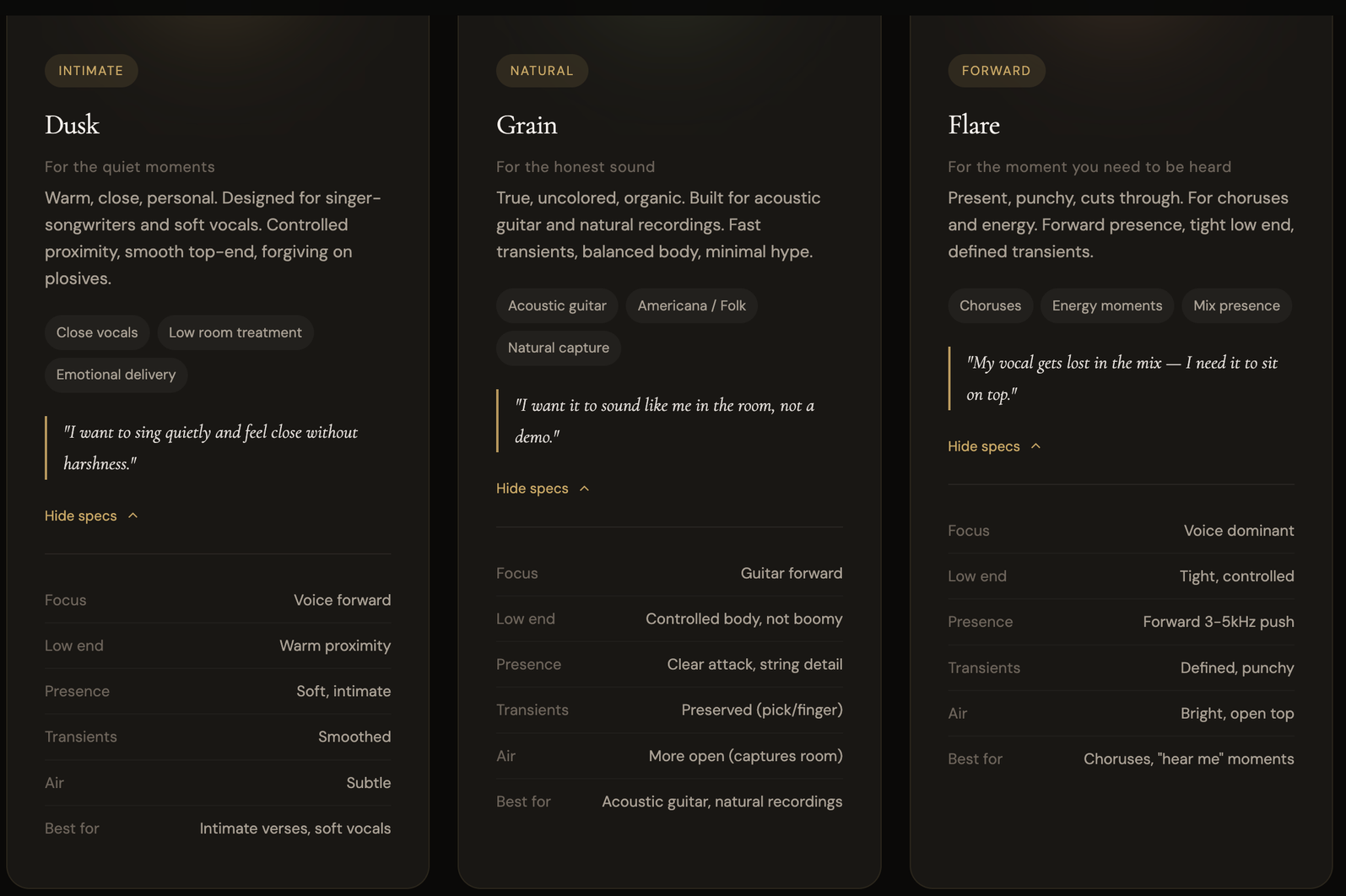
Smooth offers three mic characters. These aren't presets — they're distinct instruments, each designed for a different recording situation.
Dusk
Warm, close, personal. Dusk is built for intimate performances. It enhances proximity warmth, smooths the top end, and forgives plosives — the harsh P and B sounds that plague close-mic recording.
Best for: Singer-songwriters, soft vocals, breathy performances, emotional delivery, spoken word. Any time you want the listener to feel like the singer is right there.
What it does in practice: When you sing quietly and lean into the mic, Dusk enhances that intimacy instead of letting it get muddy. The low-end warmth from proximity effect is controlled rather than boomy. Sibilance and harshness in the upper frequencies are smoothed without dulling the vocal. You get close without the penalty of getting close.
The sound: Think late-night, low-lit, voice in your ear. The verse of a ballad. A whispered bridge. The quiet part that makes the loud part hit harder.
Grain
True, uncolored, organic. Grain captures what's actually in the room with minimal coloration. It preserves fast transients, maintains balanced body, and adds no hype — what goes in is what comes out, just more controlled.
Best for: Acoustic guitar, Americana, folk, natural vocal recordings, anything where authenticity matters more than polish. Grain is the character to use when the performance itself is the production.
What it does in practice: On vocals, Grain gives you the honest sound of your voice in the room. No sweetening, no flattery — just a cleaner, more consistent version of what's there. On acoustic guitar, it preserves pick attack and string detail while keeping the body controlled and the low end from getting boomy.
The sound: Think live room, one mic, one take. The sound of a person playing music, not a recording of someone playing music. If you want your recordings to sound like you in the room, Grain is the character.
Flare
Present, punchy, cuts through. Flare pushes the vocal forward with defined presence in the 3–5 kHz range, tight low end, and crisp transients. This is the character for moments that need energy.
Best for: Choruses, power vocals, any section where the vocal needs to sit on top of the mix. If your vocal gets buried when the instruments come in, Flare solves that at the source.
What it does in practice: Flare tightens the low end so the vocal doesn't compete with bass and drums. It pushes the presence range forward so consonants are clear and the voice cuts through without needing post-production EQ. Transients are defined rather than smoothed — every word lands with intention.
The sound: Think chorus energy, "hear me" moments, the part of the song where you stop holding back. Forward, punchy, present.
The Three Controls
Smooth has three knobs, each affecting how the adaptive engine behaves:
Distance — Controls how the adaptive processing responds to your proximity to the mic. At intimate settings, Smooth enhances the warmth and closeness of being near the mic. At wider settings, it opens up the sound for more room and space. The adaptive engine continuously adjusts based on how far you actually are from the mic.
Warmth — Controls the low-mid character of the processing. Turn it up and the vocal gets fuller, rounder, more embracing. Turn it down for a leaner, tighter sound. Smooth's adaptation means this isn't a static EQ boost — it responds to the tonal content of your performance moment to moment.
Air — Controls the high-frequency shimmer and openness. Subtle settings keep things smooth and controlled. Higher settings bring out breath, detail, and the airy quality that makes a vocal sound polished. The adaptive engine prevents this from becoming harsh even at higher settings.
These three controls interact with each other and with the mic character you've chosen. Dusk with high Warmth and intimate Distance is a completely different instrument than Flare with low Warmth and more Air. The combinations are where Smooth's versatility lives.
Setting Up a Session
Step 1: Signal Chain
Your signal chain stays the same as any recording setup:
Mic → XLR → Interface → Smooth → DAW
Smooth processes the signal from your interface. Set your gain staging as you normally would — peaks around -12 to -8 dBFS. Smooth works best with a clean, well-gained signal. It's not a fix for bad gain staging.
Step 2: Choose a Character
Start with Dusk if you're recording vocals — it's the most versatile for voice and the most forgiving. Record a quick test take — 30 seconds of the loudest and quietest parts of the song.
Listen back. If the vocal sounds good but you want more natural honesty and less intimacy, switch to Grain. If you need the vocal to cut and punch, switch to Flare. The character choice should take less than a minute.
For acoustic guitar, start with Grain. It's designed for exactly that.
Step 3: Dial the Controls
Start with the knobs at their default positions and adjust from there:
- If the vocal feels distant or thin, increase Warmth and move Distance toward intimate
- If the vocal feels too dark or muddy, pull Warmth back and add a touch of Air
- If you want more breath and shimmer, increase Air — but listen for harshness and back off if it appears
Step 4: Record
That's it. Smooth adapts as you perform. You don't need to adjust anything during the take. Sing the song. The adaptive engine handles the moment-to-moment changes in dynamics, tone, and energy.
If you're used to riding the gain knob or adjusting your distance from the mic to compensate for loud choruses, you can relax. Smooth is managing those dynamics for you. Stay at a consistent distance and focus on the performance.
Switching Characters Mid-Song
One of the most powerful ways to use Smooth is to switch characters between sections of a song.
Record the verse through Dusk — warm, intimate, close. Then switch to Flare for the chorus — present, punchy, forward. The tonal shift mirrors the emotional shift in the song, and both sections are optimized for their respective energy levels.
This is something professional engineers do manually by automating EQ, compression, and volume between sections. Smooth lets you do it by selecting a character — the adaptive engine handles the rest.
You can also comp between characters: record the full song through Dusk, then record it again through Flare, and take the verses from one and the choruses from the other.
When Smooth Helps Most
Dynamic Performances
If your songs go from a whisper to a belt — and most songs do — Smooth's adaptive dynamics control is doing the most work. The quiet sections stay present and audible without you cranking the gain, and the loud sections stay controlled without clipping.
This is the problem that usually requires careful compression after recording. Smooth handles it at the source, which means less work in the mix and fewer takes ruined by unexpected peaks.
Untreated Rooms
Smooth doesn't remove room sound, but the adaptive processing adjusts to the tonal character of your environment. If your room adds boxiness in the 200–400 Hz range (most bedrooms do), Smooth's processing gently compensates. Dusk is particularly forgiving in untreated spaces — its intimate focus naturally de-emphasizes room reflections.
This doesn't replace room treatment — a treated room will always sound better — but it reduces the impact of room problems on your recordings.
Long Sessions
When you're tracking multiple takes over an hour or two, your voice changes. It warms up, gets tired, shifts in tone and energy. Static processing can't adapt to that. Smooth does — the adaptive engine recalibrates continuously, so take fifteen sounds as consistent as take one.
What Smooth Doesn't Do
It's not a replacement for mixing. Smooth gives you a better starting point. You'll still want to mix your vocals — EQ, compression, reverb, delay, automation. The difference is that you're starting with a more consistent, more present recording, which means every mixing decision is easier and you'll often need less processing.
It's not magic for a terrible room. If you're recording next to an open window on a busy street, Smooth can't fix that. Basic room treatment still matters. Smooth reduces the impact of room problems — it doesn't eliminate them.
It's not auto-tune or pitch correction. Smooth processes tone and dynamics, not pitch. If you need pitch correction, that's a separate tool in your mix chain.
A/B Testing Your Results
The best way to understand what Smooth is doing is to record the same passage twice — once through Smooth, once bypassed (straight into your DAW with no processing).
Listen to both recordings in the context of a mix. The Smooth recording will typically sit more easily — it requires less compression, less EQ, and less volume automation to sound polished. The bypassed recording will have more dynamic range (which isn't always better in a mix context) and may need more processing to achieve the same result.
Neither is "wrong." But if you're a songwriter who wants to spend less time engineering and more time performing, the Smooth recording gets you to a finished mix faster.
Quick Tips
Don't stack Smooth with heavy compression. Smooth is already managing dynamics adaptively. If you add a compressor with 8 dB of gain reduction on top, you'll over-compress. Use light compression in the mix if needed — 2–3 dB at most.
Trust the first take feeling. One of the best things about recording through Smooth is that early takes — when the energy is fresh and the performance is spontaneous — are more likely to be usable. The adaptive processing catches the imperfections that would normally make you redo a take.
Match the character to the emotion, not the genre. Dusk isn't "for ballads" and Flare isn't "for rock." Dusk is for intimate moments and Flare is for energy moments. A rock song has quiet, close verses that belong on Dusk and loud choruses that belong on Flare. A folk song might live entirely on Grain. Let the emotion guide the choice.


